[고도몰] DB 연동하기

DB를 만들어보고 데이터를 삽입해 보겠습니다.

1.Phpmyadmin 접속

고도몰 관리자를 통해 Phpmyadmin을 접속합니다.
아래와 같이 새로운 테이블을 만듭니다.
고도몰의 가이드 기반으로 만드는데 prefix와 주석은 꼭 쓰도록 합니다.

db세팅

2.입력 페이지 퍼블리싱

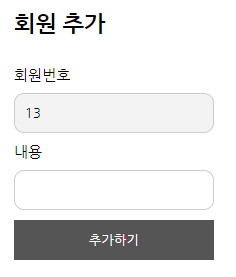
만들 기능은 회원 추가 기능입니다.
회원 번호는 DB에 저장된 마지막 번호의 다음 번호로 자동으로 지정되며,
내용은 유저가 입력할 수 있게 만들겠습니다.

/data/skin/front/스킨명/test/test.html
1
2
3
4
5
6
7
8
9
10
<section>
<form method="post">
<h2>회원 추가</h2>
회원번호
<input type="text" name="idx" value="{=data}" readonly>
내용
<input type="text" name="desc" value="">
<button type="submit">추가하기</button>
</form>
</section>

입력페이지퍼블리싱

선언한 data는 DB에 입력된 마지막 회원번호의 다음번호 입니다.

3.컨트롤러 수정

1
2
3
4
5
6
7
8
9
10
11
12
13
14
15
16
17
18
19
20
21
22
23
24
25
26
27
28
29
30
31
32
33
34
35
36
37
38
39
40
41
42
43
44
45
46
47
48
49
50
51
52
53
54
55
56
57
58
59
60
61
62
63
64
65
66
<?php

/**
* This is commercial software, only users who have purchased a valid license
* and accept to the terms of the License Agreement can install and use this
* program.
*
* Do not edit or add to this file if you wish to upgrade Godomall5 to newer
* versions in the future.
*
* @copyright ⓒ 2016, NHN godo: Corp.
* @link http://www.godo.co.kr
*/
namespace Controller\Front\Test;

use Globals;
use Session;
use Response;
use Request;


class TestController extends \Bundle\Controller\Front\Test\TestController
{
protected $db = null;

public function index() {
if (!is_object($this->db)) {
$this->db = \App::load('DB');
}

$data = $this->dbSelect();

$this->setData('data',$data);

if(Request::post()->get('desc')){
$this->dbInsert(Request::post()->get('desc'));
header("Refresh:0");
}
}

public function dbSelect()
{
$strSQL = "SELECT * FROM es_customText ORDER BY id DESC LIMIT 1";
$result = $this->db->query($strSQL);
$data = $this->db->fetch($result);

if($data) {
return $data["id"] + 1;
} else {
return 0;
}

}

public function dbInsert($field1)
{
$arrBind = [];
$date = date("Y-m-d", time());
$strSQL = "INSERT INTO es_customText SET `id` = ?, `text` = ?, `date` = ?";
$this->db->bind_param_push($arrBind, 'i', '');
$this->db->bind_param_push($arrBind, 's', $field1);
$this->db->bind_param_push($arrBind, 's', $date);
$this->db->bind_query($strSQL, $arrBind);
}

}

최초 접속시에 dbSelect 함수를 통해 DB에 데이터가 있는지 확인합니다.
데이터가 있을 경우 마지막 데이터의 회원번호에서 +1 된 값을 리턴하고
없을 경우 0을 리턴합니다.

리턴된 값을 뷰 페이지에서 사용할 데이터로 전달해 줍니다.

해당 페이지에 post로 전달된 name=”desc”의 폼 값이 존재하면 dbInsert 함수를 실행합니다.
이때 매개변수로 입력된 폼 값을 받습니다.

DB에는 회원번호,내용,시간을 넣습니다.
추가로 Insert 후 post값 리셋을 위해 페이지 새로고침을 합니다.

이제 데이터를 넣고 [추가하기]를 하면 DB에 데이터가 들어가고 회원번호가 갱신되는걸 확인 할 수 있습니다.